
Software testing is a critical stage in the software development lifecycle that ensures software applications are reliable, secure, and efficient. In 2026, software needs to work seamlessly across devices, browsers, and platforms, making manual testing, automated testing, and structured QA processes more important than ever. Understanding software testing basics helps developers and QA engineers detect software defects, enhance user experience, maintain software reliability, and reduce risks that can affect customer satisfaction.
This guide covers everything from core definitions to practical steps, types of testing, tools, and modern approaches in agile workflows and DevOps practices.
What Is Software Testing? Clear Definition with Real Examples
Software testing is the evaluation of software to ensure it functions as intended and meets defined quality standards. Testing identifies software defects, validates workflows, and confirms the application performs well under real-world conditions. It includes static testing—reviewing code and documentation without running the program—and dynamic testing, which executes software to validate functionality.
For example, in fintech applications, security testing ensures sensitive financial data is protected, while unit testing confirms calculation functions work correctly. In mobile application testing, compatibility testing ensures the app works on both iOS and Android devices, and cross-browser testing ensures web applications run correctly on Chrome, Safari, and Edge. Effective software testing guarantees software quality, reduces risk, and enhances user experience, preventing costly issues before the software reaches customers.
Why Software Testing Basics Matter in Modern Development (2026 Perspective)
Modern software development relies heavily on CI CD pipeline, agile workflows, and DevOps testing. Software today often interacts with cloud storage, APIs, and multiple platforms, which increases complexity. Skipping testing can lead to missed defects, poor user validation, and system failures. Early manual testing and automation testing in the software development lifecycle reduce defects, improve software reliability, and maintain customer satisfaction.
Studies show that software defects cost companies over $1.1 trillion annually (source). Understanding software testing basics helps testers create test cases, test scripts, and test scenarios that effectively detect errors, while improving software performance and reducing risks in agile testing and DevOps testing environments.
The Real Cost of Ignoring Software Testing
Ignoring software testing can be extremely costly. Unchecked defects affect software reliability, security compliance, and user experience. In high-stakes industries like healthcare applications or fintech applications, failing to conduct penetration testing, load testing, or stress testing can result in data breaches, financial losses, and regulatory penalties.
The later a defect is detected, the higher the cost. Fixing production bugs involves emergency patches, customer support issues, and potential reputational damage. Using structured testing, early testing, and effective defect reporting allows teams to catch errors during unit testing, integration testing, and system testing, reducing risks and maintaining software performance and software reliability.
Core Objectives of Software Testing
Software testing serves several objectives: improving software quality, verifying functionality, ensuring user experience, detecting defects, and maintaining security compliance. Testing protects organizations from costly errors while enhancing software efficiency, reliability, and usability.
Quality Assurance and Defect Prevention
Quality assurance focuses on preventing defects before software reaches users. It uses structured testing, test cases, test scripts, and a controlled test environment. Static testing examines code and requirements for errors without running the application, while dynamic testing executes software to verify functionality.
QA teams use test management tools and bug tracking to maintain test documentation, monitor the bug lifecycle, and ensure all defects are reported and resolved. This approach improves software reliability, user validation, and reduces risks during agile testing and DevOps testing.
Security, Reliability, and Performance Assurance
Testing ensures software is secure, reliable, and performs well. Penetration testing identifies vulnerabilities, reliability testing confirms continuous operation, and performance testing, load testing, stress testing, and volume testing measure system behavior under different conditions.
Automation through QA automation supports regression testing, end-to-end testing, and test coverage, enabling automation engineers to focus on complex issues. This improves software quality, safeguards cloud storage, maintains data integrity, and prevents costly defects.
Manual vs Automated Testing Explained Simply
Manual testing and automation testing are two core approaches in software testing basics, each serving distinct purposes. Manual testing focuses on human evaluation, allowing QA engineers to check the software from a user’s perspective, examine workflows, and validate usability. It is flexible and suitable for scenarios where exploratory testing or user acceptance testing is required. On the other hand, automation testing uses automation tools to execute test scripts repeatedly, ensuring consistent test coverage, faster defect detection, and continuous validation in CI CD pipeline and DevOps testing workflows. Combining both approaches gives teams the ability to maintain software reliability, detect software defects early, and improve software performance.
When Manual Testing Works Best
Manual testing is most effective when human judgment is needed to validate software behavior. It is ideal for exploratory testing, usability testing, beta testing, and user acceptance testing, where human intuition and observation detect interface issues or unusual workflows. Human testers can also apply decision table testing to validate complex business logic. This approach is particularly important in sensitive applications like fintech applications or healthcare applications, where data integrity and security compliance are critical, and mistakes could result in high financial or operational risks.
When Automation Prevents Costly Bugs
Automation testing is essential for repetitive tasks, regression testing, and performance evaluation. It ensures that frequent unit testing, integration testing, and system testing are consistent, accurate, and faster. Automation testing supports cross-browser testing, end-to-end testing, and performance testing, allowing automation engineers to detect defects before they affect customers. Tools like Selenium testing, Playwright testing, Ranorex testing, and BrowserStack testing help implement robust test coverage, maintain test documentation, and improve software reliability across multiple platforms.
“Discover how Testing StoneCap3.0.34 software delivers robust performance, innovative features, and proven reliability to boost your QA workflow effortlessly.”
Major Types of Software Testing You Must Know
Software testing covers multiple categories to verify both functional and non-functional aspects of software. Understanding these types helps teams design proper test strategies, maintain software quality, and enhance user experience. Core methods include white box testing, which evaluates internal code; black box testing, which validates functionality without looking at code; and grey box testing, which combines both approaches. These testing methods, along with functional and non-functional evaluation, ensure software meets requirements, performance standards, and security compliance.
Functional vs Non-Functional Testing
Functional testing focuses on whether the software performs its intended features correctly. It checks workflows, input-output behavior, and end-to-end testing scenarios. Non-functional testing evaluates attributes like performance optimization, usability testing, scalability testing, and security testing. Both are necessary to deliver software that is reliable, secure, and user-friendly. Without addressing non-functional aspects, even fully functional software may fail under real-world conditions.
White-Box, Black-Box, and Grey-Box Testing
White box testing inspects internal code, logic, and execution paths, commonly used during unit testing and test-driven development. Black box testing evaluates software behavior from a user’s perspective without knowledge of internal code, applied in system testing, acceptance testing, and beta testing. Grey box testing merges the two approaches, allowing testers to assess critical logic internally while validating outputs externally. It is especially useful in API testing and security testing, where a balance of code insight and user perspective ensures thorough defect detection and software reliability.
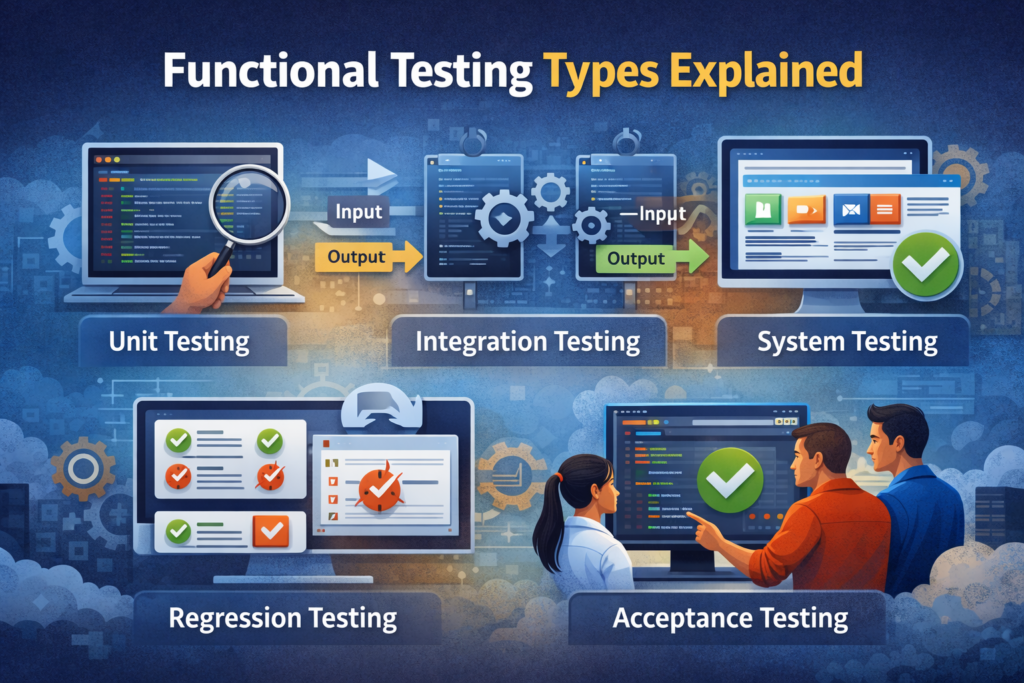
Functional Testing Types Explained
Functional testing ensures all features work according to specifications, supporting strong software quality and user validation. This testing type examines specific test scenarios, confirming that each function behaves as intended.
Unit, Integration, and System Testing
Unit testing targets individual components, ensuring each function operates correctly. Integration testing verifies that combined modules, like login and payment processes, work together seamlessly. System testing evaluates the fully integrated application against quality standards and test scenarios, ensuring the software meets functional requirements and maintains software reliability.
Regression and Acceptance Testing
Regression testing confirms that new updates or bug fixes do not break existing features, ensuring ongoing stability. Acceptance testing validates software against user expectations before deployment, typically in user acceptance testing scenarios. These processes are critical for maintaining software performance, customer satisfaction, and risk reduction in production environments.
Non-Functional Testing Types That Protect User Experience
Non-functional testing ensures the software performs well under real-world conditions, maintains security, and supports a positive user experience. Unlike functional testing, it focuses on the quality attributes of software rather than specific features.
Performance and Load Testing
Performance testing evaluates responsiveness and stability during normal operations. Load testing simulates high user demand to test scalability, while stress testing evaluates extreme conditions. Volume testing checks the system’s ability to handle large datasets. These tests are essential for fintech applications, cloud storage, and other high-traffic platforms to maintain software reliability and software performance.
Usability, Compatibility, and Security Testing
Usability testing ensures applications are intuitive and easy to use. Compatibility testing confirms cross-platform and cross-browser functionality, including mobile application testing. Security testing prevents breaches, validates compliance testing, and ensures data integrity. Together, these non-functional tests enhance software quality and protect users from potential risks.
Certifications and Learning Path for Software Testing Beginners
Beginners can pursue certifications like ISTQB, participate in online courses, and practice with tools such as Selenium testing, Playwright testing, and Ranorex testing. A structured learning path ensures strong software testing basics, effective test documentation, and career growth in automation engineering and QA automation roles.
“Learn the real cost of 493xds5.0 software and why understanding pricing, hidden fees, and licensing options is crucial before investing in your tools.”
Frequently asked questions (FAQs)
What is the difference between manual testing and automated testing?
Manual testing involves human testers evaluating software by following test cases and interacting with the application. Automated testing uses automation tools like Selenium testing or Playwright testing to run test scripts automatically, ideal for repetitive tasks, regression testing, and cross-browser testing. Combining both approaches ensures software reliability and improved user experience.
Why is early testing important in the software development lifecycle?
Early testing, also called shift-left testing, detects software defects at the start of the software development lifecycle. Catching bugs in unit testing or integration testing reduces cost, prevents delays, improves software quality, and ensures smoother releases in agile workflows or DevOps practices.
How does functional testing differ from non-functional testing?
Functional testing verifies that software features work correctly according to requirements, using methods like unit testing, system testing, and acceptance testing. Non-functional testing evaluates performance testing, security testing, usability testing, compatibility testing, and scalability testing to ensure the software is reliable, secure, and user-friendly.
What are the main types of software testing beginners should know?
Beginners should focus on unit testing, integration testing, system testing, regression testing, acceptance testing, smoke testing, sanity testing, and beta testing. Understanding white box testing, black box testing, and grey box testing is also essential for building strong software testing basics skills.
What is the purpose of regression testing?
Regression testing ensures that new updates or fixes do not break existing features. It is crucial for software reliability, test coverage, and maintaining software performance, especially in applications with frequent updates like fintech applications or healthcare applications.
How can automation testing improve software quality?
Automation testing executes repetitive test scripts consistently, reduces human errors, and supports continuous testing in CI CD pipeline and DevOps testing environments. It improves test coverage, detects defects early, and helps teams maintain software reliability and user satisfaction.
What is the test automation pyramid, and why is it important?
The test automation pyramid organizes testing into layers: unit tests at the base, integration/service tests in the middle, and end-to-end testing at the top. This strategy prioritizes fast, reliable testing, lowers maintenance costs, and ensures full software quality assurance without unnecessary overhead.
When should a QA engineer use white-box testing?
White box testing is used when the tester needs to verify internal logic, code paths, and execution. It is commonly applied in unit testing and test-driven development to confirm that software defects are minimized and software reliability is maintained.
Why is security testing crucial for software applications?
Security testing protects user data, validates compliance testing, and ensures applications are safe from breaches. It is particularly critical in fintech applications, healthcare applications, and systems handling sensitive information to maintain data integrity and software quality.
How do cross-browser testing and mobile application testing help?
Cross-browser testing ensures the software works on browsers like Chrome, Safari, and Edge, while mobile application testing checks compatibility across iOS and Android devices. Both are key to delivering a consistent user experience, software reliability, and software performance across platforms.
What is the difference between smoke testing and sanity testing?
Smoke testing checks whether the basic functionalities of the software are working before deeper testing. Sanity testing is a quick evaluation to verify that specific functions or bug fixes behave as expected. Both reduce wasted effort and improve test efficiency.
How can beginners expand test coverage without increasing costs?
Beginners can combine manual testing and automation testing, reuse test scripts, prioritize critical workflows, and use tools like BrowserStack testing or Ranorex testing. This approach ensures high test coverage while controlling time and budget, improving software quality.
What is the role of test documentation in software testing?
Test documentation includes test plans, test cases, and test reports. It provides a clear guide for QA engineers, supports defect reporting, and helps track the bug lifecycle, improving risk reduction, software reliability, and future testing efficiency.
How does performance testing protect the user experience?
Performance testing evaluates software responsiveness, stability, and speed under normal conditions. Load testing, stress testing, and volume testing ensure the application can handle high traffic and large datasets. This protects software performance, prevents crashes, and enhances user satisfaction.
Which certifications are recommended for software testing beginners?
Certifications like ISTQB, Certified Software Tester, and courses on platforms like Udemy or Coursera provide structured learning paths. They cover manual testing, automation testing, test management tools, and test strategies, giving beginners credibility and strong skills for real-world software development lifecycle projects.
Final Thoughts: Building Bug-Free Software with Strong Testing Basics
Software testing is the backbone of reliable software development. Applying structured QA processes, combining manual testing with automation testing, and maintaining clear test documentation ensures high software quality, user experience, and software reliability. Teams that focus on early testing, test coverage, and defect prevention reduce costs and deliver software that meets modern standards and customer satisfaction expectations.
Disclaimer:
“The content in this article is for educational purposes only. It provides general information on software testing and development. Readers should not rely on it as professional advice. Always assess risks and consult qualified professionals before making decisions.”